Backoffice CRM

The control center for your brokerage

Every tool you need to manage clients, track revenue, ensure compliance, and grow your business — in one unified back office. From the first lead to the thousandth client.

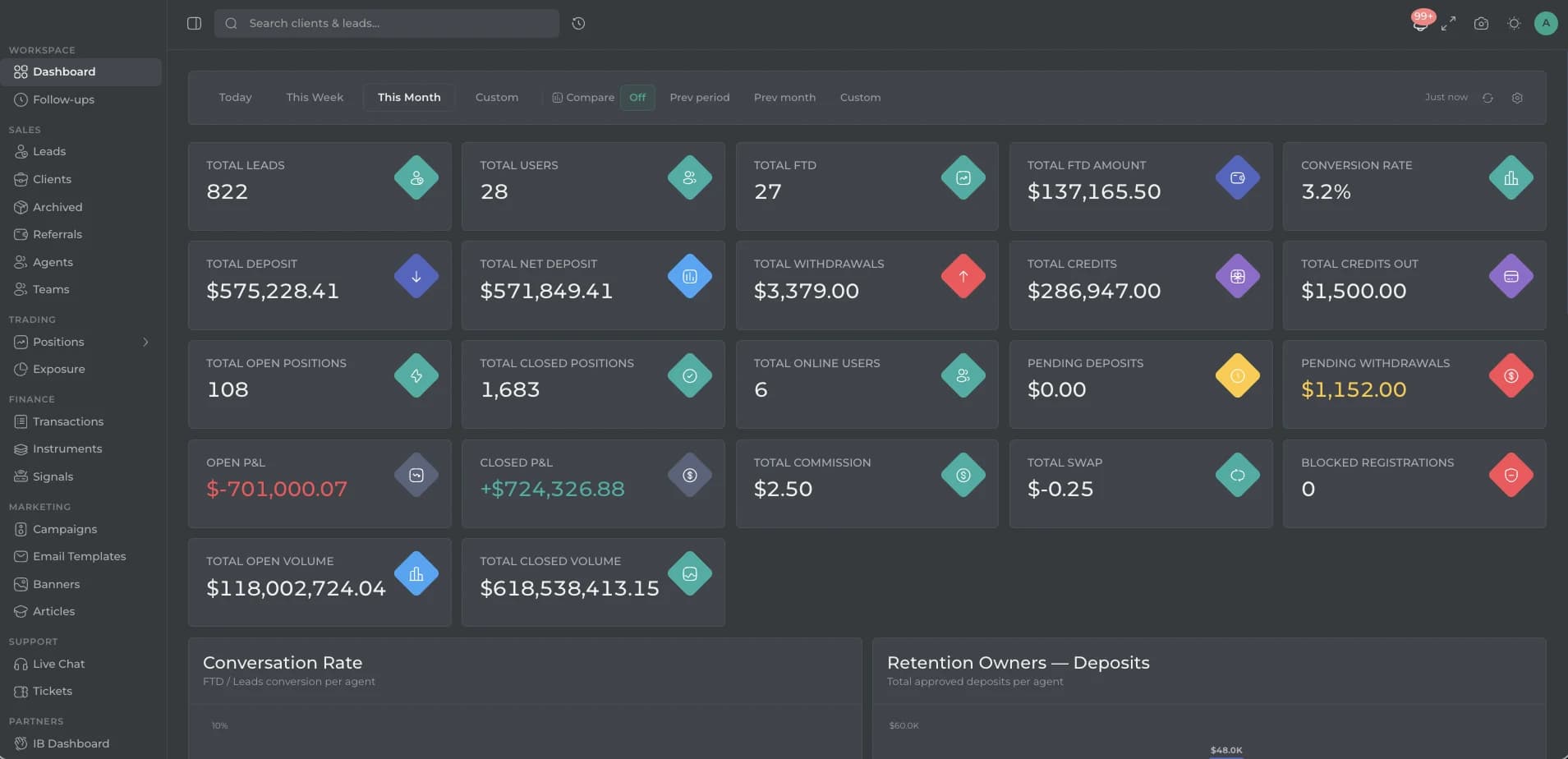
The Synovo CRM dashboard showing total leads, users, deposits, withdrawals, open positions, and P&L metrics with a navigation sidebar for sales, trading, finance, marketing and support modules.

Sales & clients

From first lead to loyal client

Capture, assign, and convert leads with a pipeline built for brokerages. Every client gets a 360-degree profile your whole team works from.

  • Dashboard and analytics

    Performance dashboard

    Total leads, active users, deposits, withdrawals, trading volume, P&L, and commissions — filtered by today, this week, this month, or custom date ranges.

  • Sales and client management

    Lead pipeline

    Capture leads from every channel and track them through your sales pipeline. Assign leads automatically with round-robin distribution or manually by language, region, or product interest.

  • Sales and client management

    Client profiles

    A 360-degree view of every client — trading activity, account balances, deposit and withdrawal history, compliance status, communication log, and assigned agent on a single screen.

  • Sales and client management

    Team management

    Organize your sales operation with teams, roles, and hierarchies. Agent-level permissions, round-robin lead distribution, and performance tracking.

  • Sales and client management

    Follow-up scheduling

    Schedule and track follow-ups for every lead and client. Never miss a callback — tasks surface automatically based on due dates, priority, and pipeline stage.

Trading operations

Monitor risk in real time

See every open position, aggregate exposure, and configure instruments across your entire client base — from one screen.

  • Trading operations

    Position monitoring

    See every open position across your entire client base in real time. Filter by instrument, client, account type, or direction to identify risk before it becomes a problem.

  • Trading operations

    Exposure dashboard

    Aggregate risk exposure by instrument, client group, or direction. Net long and short positions across every market for informed hedging decisions.

  • Trading operations

    Instrument configuration

    Add, remove, and configure 500+ trading instruments across six asset classes. Set spreads, margin requirements, and order limits per instrument — changes take effect immediately.

Finance & compliance

Every transaction, fully audited

Process deposits and withdrawals, manage compliance queues, and keep a complete audit trail — all without leaving the back office.

  • Finance and transactions

    Transaction ledger

    Every financial movement — deposits, withdrawals, credits, bonuses, adjustments, and internal transfers — with full audit trail, timestamps, and approval chains.

  • Finance and transactions

    Multi-channel deposits

    Accept client deposits through multiple channels. Configure available methods per account type. Set minimum and maximum limits with real-time status tracking.

  • Finance and transactions

    Withdrawal management

    Process client withdrawals with built-in compliance checks. Approve, hold, or reject requests based on your business rules. Anti-fraud screening flags suspicious patterns.

  • Compliance and KYC

    KYC queue

    A streamlined document verification workflow. New submissions enter the queue, reviewers verify documents, and approvals or rejections are logged with notes and status tracking.

  • Compliance and KYC

    Security controls

    IP allowlist, activity log recording who did what and when, and granular permission management so each team member sees only what they need.

Marketing & support

Grow, engage, and retain

Run campaigns, publish content, chat with clients, and automate lifecycle events — from the same system your sales team already uses.

  • Marketing suite

    Campaign manager

    Create, schedule, and track marketing campaigns from within the CRM. Measure reach, engagement, and conversion linked directly to lead generation.

  • Marketing suite

    Email templates and banners

    Design branded email templates for onboarding, promotions, and notifications. Manage promotional banners and content displayed across your client-facing properties.

  • Marketing suite

    Content management

    Publish articles, market updates, and educational content directly from the CRM. Keep your client-facing knowledge base fresh without leaving the back office.

  • Client support

    Live chat and tickets

    Built-in live chat connects your support team with clients in real time. A ticket system handles structured support requests with categories, priorities, and status tracking.

  • Automation and system

    Automation rules

    Define triggers and actions for client lifecycle events. Automate follow-up reminders, status changes, notifications, and alerts based on client behavior.

  • Automation and system

    Account type configuration

    Create account types with custom leverage, trading permissions, swap-free options, deposit methods, and KYC requirements.

Client lifecycle

From first lead to loyal trader

  1. Lead capture

    A sign-up arrives with its traffic source, is scored, and assigned to the right account manager automatically.

  2. KYC and onboarding

    Identity documents enter the review queue. Your compliance team verifies, approves, or rejects — with a full audit trail.

  3. First deposit

    The client deposits through one of your configured channels. Funds are linked to their trading account in real time.

  4. Active trading

    Open positions, trading volume, P&L, and account balances update live on the client profile and your dashboard.

  5. Retention and growth

    Campaigns, bonuses, referral tracking, and support tickets help your team keep clients engaged and trading.

Our track record

Powering brokerages across the globe with reliable trading infrastructure

Brokers
40+
Partners
30+
Years of Experience
10+
Start your brokerage

Back office FAQ

Questions about the CRM and back office

How the CRM fits your team, your compliance process, and your trading platform.

01Does the CRM connect to the trading platform?

Yes. Registrations, accounts, deposits, withdrawals, and trading activity from the platform appear in the CRM automatically — no manual data entry or third-party middleware.

02Can our compliance team review KYC in the CRM?

Yes. Documents enter a dedicated review queue where your team can verify, approve, or reject each submission. Every action is logged with timestamps and reviewer notes for a full audit trail.

03Can we control what each team member sees?

Yes. Granular role-based permissions let you define exactly what each team member can view and do. Sales sees leads and clients, compliance sees KYC and documents, finance sees transactions — and managers see everything.

04What reporting is available?

The dashboard shows total leads, active users, deposits, withdrawals, trading volume, P&L, and commissions — filterable by date range. Data can be exported for finance and compliance teams.

05Can we run marketing campaigns from the CRM?

Yes. The built-in marketing suite lets you create, schedule, and track campaigns. Design branded email templates for onboarding and promotions, manage promotional banners, and measure conversion linked directly to your lead pipeline.

06Does the CRM support automation?

Yes. Define triggers and actions for client lifecycle events — automate follow-up reminders, status changes, notifications, and alerts based on client behavior, deposit activity, or inactivity thresholds.

Get started

Ready to launch your brokerage?

From branded platform to live trading in days, not months. Talk to our team and see the full stack in action.